Firefox is much more than a web browser — its a platform. Numerous applications run on Firefox’s XUL framework, mostly as plugins. This extensibility gives you greater control over how web pages appear by blocking ads, turning off automatic flash animations by default, and offering site-specific customizations for some of the most popular web apps. It also allows you to better process that information by integrating with social software, storing local copies of web pages, syncing data between computers, looking up words in foreign languages, and identifying semantic content embedded in many web pages.
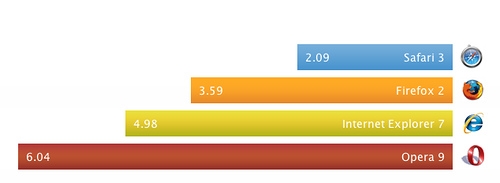
In short, if you spend a significant amount of your life online you don’t just need any web browser, you need Firefox. But here is the problem, if you are a Mac user you’ve probably noticed that Safari is faster, more responsive, and less likely to hog your system’s memory. But switching to Safari means giving up those all-so-useful extensions. (The same is true of Camino, a streamlined version of Firefox for the Mac.) Fortunately, some clever coders have found ways to replicate the functionality of some of the most popular Firefox extensions in Safari. Below is a list of my favorite Firefox plugins and the closest replacement I could find for Safari. I’ve assigned each a rating according to how well they replicate the features I depend on in Firefox.
Found Replacements:
AdBlock Plus+ FlashBlock = SafariBlock (7/10 — Doesn’t auto-update block list, and Flash blocking is opt-out, not opt-in.)
1Password = 1Password (10/10 — Same program. Works even better in Safari)
Greasemonkey = GreaseKit (7/10 — Can run scripts, but differences in javascript between browsers mean that many scripts don’t work properly.)
TinyURL Creator = TinyURL Service (9/10 — Not in toolbar.)
del.icio.us Bookmarks = DeliciousSafari
(5/10 — Sorts alphabetically rather than by date, doesn’t allow combining tags with “+” sign, not in bookmarks bar, can’t see popular tags when bookmarking new item.)(7/10 — The latest update now offers tag suggestions and combining tags — still missing sorting by date and better integration into the browser.)Content Preferences = SafariStand (8/10 — Has many more features than the Firefox plugin, but the feature I need most — encodings — only offers Japanese encodings and Unicode, not Chinese. Note: This feature is built into Firefox 3.)
Operator = Safari Microformats Plugin (7/10 Only works with hCards and hCalendars so far.)
FireBug = Web Inspector (10/10 — I like Web Inspector even better, and FireBug can seriously slow down Safari.)
Undo Closed Tabs + Remember Sessions = ForgetMeNot + SafariStand (10/10 — These are now built-in features of Firefox.)
Readeroo = Bookmarklets (7/10 — Not as slick.)I now use Instapaper, which is platform independent.SwitchProxy = Proxy On/Off (7/10 Works great, but the GUI isn’t as nice and having to use the dashboard is a pain.)
新同文堂 = Safari PowerToy (Currently not compatible with Intel Chipset)
Firefox Search Plugins = Acid Search (Doesn’t seem to work with 10.4 it disabled all my other plugins! Firefox search plugins are a built-in feature.)
Download ThemAll! = Speed Download (8/10 — Not free.)
PDF Download = Hidden Safari PDF Option (5/10 — Doesn’t give you options, just forces Safari to download the PDF.)
Google Gears = Google Gears for Webkit (I haven’t tried this yet.)
Scrapbook = Evernote (Even though it is still only in beta, Evernote’s cross-platform features make it preferable to Scrapbook for me.)
Still Looking:
- Zotero
- Resurrect Pages
- Autocomplete Manager (Note: This feature is built in to Firefox 3.)
- Google Browser Sync (You can do this for Safari with .Mac, but I don’t have .Mac.)
- Bug Me Not
- Video Downloader
- Lifehacker plugins: Better Flickr, Gmail, GReader, YouTube, and About This Site (Most of these are originally greasemonkey scripts, but its handy to have them all bundled together.)
Yes, I understand that if I didn’t have so many extensions installed Firefox would be faster, more responsive, and have less memory leaks. But some of these plugins, like 新同文堂, which allows me to make webpages from Mainland China load in complex characters, as well as SwitchProxy, which allows me to easily connect to my university proxy when doing online research, are indispensable. Others are just damn useful. What to do? For now, I’m just waiting for Firefox 3…
UPDATE: Updated the list on 1/11/08. Found a few more possibilities, some still in development. My guess is that Firefox 3 will come out before these plugins are up to par. Still I’m going to give Safari a go. Lets’ see how long I last using Safari as my main browser, now that I have it all pimped-out.
UPDATE: Updated the list on 1/18/08. I’ve managed to go a whole week with Safari. Biggest downsides: AdBlock Plus doesn’t work so well. Del.icio.us integration is not as nice either. And I really miss Switch Proxy when doing research. Also, no Zotero. The last two can be solved by switching to Firefox for academic research and using Safari the rest of the time. More serious is that some pages seem to not just crash Safari, but bring my whole system to a halt. Rare, but Firefox never affects my whole system in this way. Still, overall I have to say that I like the “snappiness” of Safari better. Now that I’ve pimped it out with all these additions I can really switch between the two apps as I please and so I’m using Safari much more. We’ll see when Firefox 3 comes out if I don’t switch back …
UPDATE: Made lots of updates on 2/10
UPDATE: Added Evernote on 3/30
